Can You Block Contacts on Tinder Before Matching?
Discover how Tinder’s contact blocking feature works and how to prevent specific people from appearing in your recommendations
Navigating the modern dating app landscape can sometimes feel like walking through a digital minefield. With millions of users swiping daily, the last thing anyone wants is an awkward encounter with an ex-partner, a colleague, a boss, or an estranged family member. Privacy features have become one of the most critical factors for online daters, and Tinder has continuously evolved its toolkit to give users more control over who sees their profile. One of the most frequently asked questions regarding online dating security is: Can you block contacts on Tinder before matching?
The short answer is yes, absolutely. Tinder offers a powerful, built-in feature specifically designed to prevent you from ever seeing—or being seen by—people already stored in your smartphone’s address book. Whether you want to avoid uncomfortable workplace run-ins or keep your dating life completely separate from your personal and professional circles, understanding how to utilize this tool effectively is essential. In this comprehensive guide, we will explore how Tinder’s contact blocking feature works, how to set it up step-by-step, alternative privacy strategies, and advanced tips to keep your online dating experience secure and stress-free.
Understanding How Tinder’s Block Contacts Feature Works
Before diving into the setup process, it is important to understand the mechanics behind Tinder’s contact-blocking system. Introduced as a privacy-first initiative, this feature allows you to sync your phone’s address book directly with the Tinder application. Once synced, Tinder scans the phone numbers stored in your contacts and cross-references them with its database of registered users.
When you select specific individuals from your contact list to block:
- Mutual Invisibility: The blocked contacts will not see your profile in their swipe deck, and you will not see theirs.
- Pre-Match Protection: This protection applies before any matching or swiping occurs, ensuring you never accidentally swipe right or left on someone you know in real life.
- Discretion Assured: Tinder does not notify the people you block. They will simply never encounter your profile, leaving them completely unaware that you have filtered them out.
- No Notification Sent: Your contacts will not receive a text, alert, or notification indicating that you are using Tinder or that you have chosen to block them.
This proactive approach eliminates the anxiety of opening the app and instantly spotting a familiar face. By establishing these boundaries early, you can swipe with confidence and peace of mind.
Step-by-Step Guide: How to Block Contacts on Tinder Before You Match
Setting up the contact-blocking feature is straightforward, but it requires access to your device’s contact list. Follow these step-by-step instructions to secure your profile within minutes, whether you are using an iOS or Android device:
- Open the Tinder App: Launch Tinder on your smartphone and ensure you are logged into your active account.
- Navigate to Your Profile: Tap on the Profile icon located in the bottom right corner of the main navigation bar.
- Access Settings: Tap on the Settings gear icon situated in the top right corner of your profile screen.
- Find Privacy Controls: Scroll down through the general settings menu until you locate the section labeled Block Contacts. Tap on it to proceed.
- Grant Permission (If Prompted): If this is your first time using the feature, Tinder will request permission to access your phone’s contact list. Tap Allow or Grant Access. Note: Tinder only uses this data for the purpose of blocking contacts and does not spam your contacts or store them for marketing purposes.
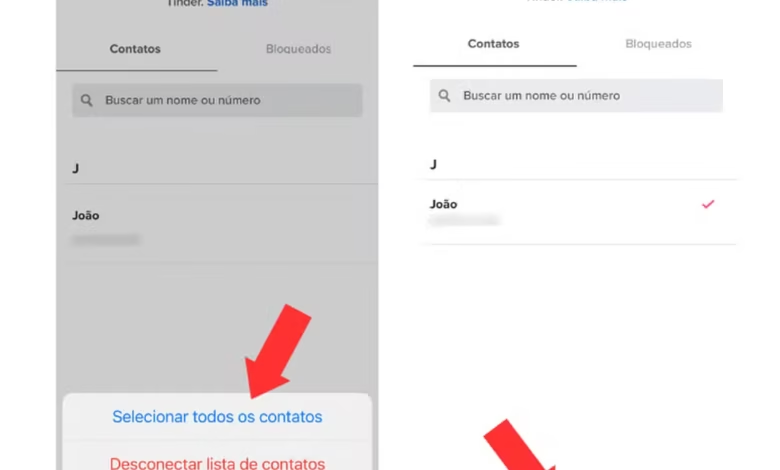
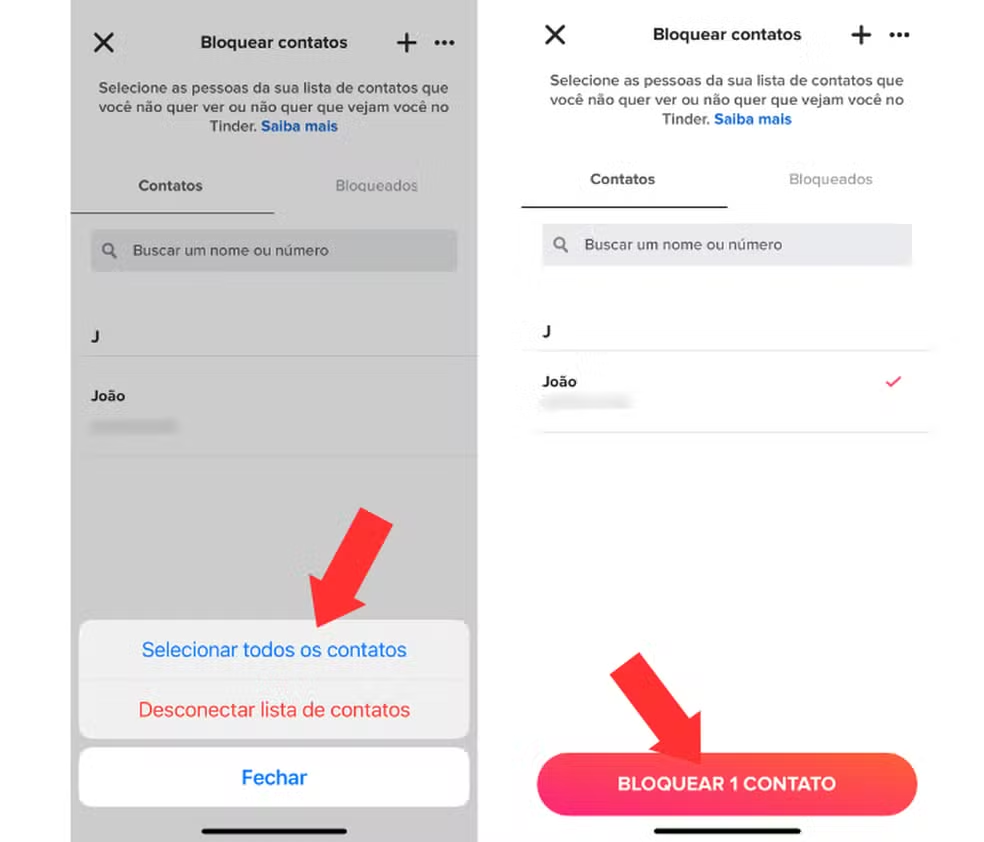
- Select Contacts to Block: Once your address book loads within the app, you can manually search or scroll through your list. Check the boxes next to the specific individuals you wish to block.
- Confirm Your Selection: After selecting everyone you want to exclude, tap the Block Contacts confirmation button at the bottom of the screen.
You can return to this menu at any time to add new phone numbers or unblock someone if your circumstances change.
Can You Block Contacts Without Importing Your Entire Address Book?
A common concern among privacy-conscious daters is whether they are forced to upload their entire phonebook to Tinder’s servers. Many people prefer to keep their personal data strictly private and feel hesitant about syncing hundreds of business contacts, clients, or acquaintances just to block a single person.
Fortunately, Tinder offers a flexible alternative. While the primary method involves syncing your address book for easy bulk selection, you also have the option to enter phone numbers manually:
- Manual Entry: Within the Block Contacts menu, you can choose the option to add a contact manually by typing in their specific phone number. This ensures that only the exact individuals you specify are added to your block list.
- Revoking Access Afterwards: Once you have selected or imported the contacts you want to block, you can go into your phone’s operating system settings (iOS Settings or Android App Permissions), revoke Tinder’s access to your contacts, and the block list will remain active within the app for the numbers you already locked in.
This level of granularity gives you complete control over your digital footprint without requiring total compromise of your device’s address book privacy.
What Happens After You Block Someone on Tinder?
Understanding the aftermath of blocking someone helps manage expectations and ensures the feature is working as intended. When you successfully block a contact before matching:
- Erasing Existing Connections: If a person you block was somehow already a match or a conversation partner on Tinder, blocking their contact number will instantly remove the match, delete the chat history, and prevent future communication.
- Profile Redundancy: If the blocked individual uses a different phone number on Tinder than the one stored in your phone, they might theoretically still see your profile unless they are registered under that specific number. However, for 99% of users who keep a primary mobile number, the protection is airtight.
- No Recourse for Them: The blocked user has no way of appealing or knowing why they cannot find you. To them, your profile simply does not exist on the platform.
This seamless removal mechanism guarantees that accidental connections or past relationships are neatly pruned from your dating ecosystem.
Advanced Online Dating Privacy Tips Beyond Contact Blocking
While blocking contacts before matching is a monumental step toward a secure dating experience, true digital safety requires a multi-layered approach. To ensure your online dating journey remains private, enjoyable, and safe, consider implementing these advanced best practices:
- Use Distinct Profile Photos: Avoid using the exact same profile pictures across your professional networks (like LinkedIn) and your dating profiles. Utilizing unique photos makes reverse-image searches much harder for casual acquaintances.
- Connect via Secure Messaging First: Before handing out your personal phone number, home address, or social media handles, keep conversations within the secure confines of the Tinder messaging ecosystem until you establish trust.
- Utilize a Google Voice Number: If you do decide to move off the app to text or call, consider setting up a free Google Voice number or a secondary burner number rather than giving out your primary cellular digits right away.
- Leverage Incognito Mode (Tinder Gold/Platinum): If you want maximum discretion, consider using Tinder’s Incognito Mode. This premium feature allows you to only be seen by people you have already swiped right on, giving you total control over your visibility.
- Trust Your Instincts: If a profile looks suspicious, lacks verification, or raises red flags, utilize Tinder’s reporting tools immediately to protect yourself and the wider community.
Troubleshooting Common Issues with Tinder’s Block Contacts Feature
Occasionally, users may encounter minor glitches when trying to block contacts. Here is how to resolve the most common hiccups:
- Contacts Not Loading: If your address book fails to appear, check your phone’s system settings to ensure Tinder has explicit permission to read your contacts. Restarting the app often resolves synchronization delays.
- Blocked Person Still Visible: Double-check the phone number associated with that person. If they registered on Tinder using a secondary phone number or an old mobile line that is not saved in your current address book, they may still appear. You can manually add that alternate number to resolve the issue.
- App Crashes During Sync: If you have thousands of contacts, syncing might overwhelm the app cache. Try clearing your cache or restarting your device before attempting to upload your list again.
Take Control of Your Dating Journey Today
Online dating should be an exciting, empowering, and safe way to meet new people—not a source of social anxiety. Knowing that you can block contacts on Tinder before matching gives you the ultimate psychological safety net, allowing you to swipe freely without the fear of running into coworkers, exes, or family members.
By taking advantage of built-in privacy tools like address book syncing, manual blocking, and maintaining smart digital hygiene habits, you can curate a dating space that respects your boundaries. Take a few minutes today to review your privacy settings, block those unwanted contacts, and step into your online dating journey with total confidence.