Apps
How Tinder Passport Works
Learn how Tinder Passport works and how to change your location to connect with people in other cities and countries
Have you ever wondered how people seem to match with folks on the other side of the planet before even packing their bags? Or perhaps you live in a smaller town, have exhausted your local dating pool, and want to see who is out there in a bustling metropolis like New York or Los Angeles before your next vacation. Enter a feature that completely changes the online dating game: Tinder Passport.
If you are curious about how this feature works, how to use it, and whether it is worth adding to your dating toolkit, you are in the exact right place. This comprehensive guide will walk you through everything you need to know about Tinder Passport, breaking down the mechanics, strategies, privacy considerations, and tips to make the most of your global swiping experience—all without needing a complex manual or technical degree.
What Is Tinder Passport and How Does It Work?
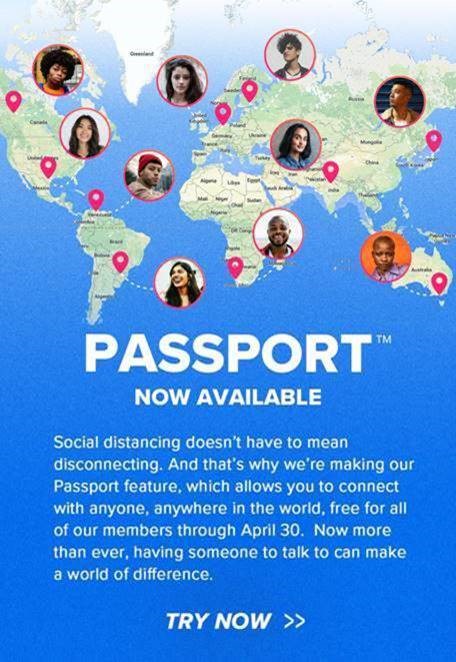
At its core, Tinder Passport is a premium feature that allows you to change your location on the app to any city or country in the world before you even arrive there.
Normally, dating apps rely heavily on your smartphone’s built-in GPS. Your device tells the app your exact latitude and longitude, and Tinder matches you with other singles within a specific radius (say, 5 to 50 miles) of your current physical spot. While this is great for finding people nearby, it is quite limiting if you love to travel, plan to move soon, or simply want to expand your horizons beyond your local neighborhood.
With Tinder Passport, the app essentially tricks your location settings. Instead of using your phone’s live GPS data, it uses whatever location you manually pin on the world map.
-
The Magic Behind the Scenes: When you select a new city, Tinder drops a virtual pin there. From that moment on, all the profiles that appear on your screen will be locals or travelers currently set to that specific destination. You can start swiping, matching, and chatting with people miles and miles away as if you were sitting in a local coffee shop right in the heart of that city.
The Evolution of Tinder Passport: From Paid Feature to Free Access
One of the most exciting developments in the history of this feature involves its accessibility. When Tinder Passport was first introduced years ago, it was locked securely behind expensive subscription paywalls. Only users who paid top dollar for Tinder Plus could unlock the ability to teleport across the globe.
However, Tinder has periodically tested and rolled out changes to make this feature more democratic. During various global events and shifts in policy, Tinder even unlocked Passport for all users for limited windows, allowing everyone to experience the thrill of global connection for free.
Today, while availability can sometimes fluctuate based on promotional rollouts, tiered subscription packages (such as Tinder Plus, Tinder Gold, and Tinder Platinum) are the most reliable way to ensure permanent, uninterrupted access to the Passport feature. If you are serious about using location-independent matching as part of your regular dating routine, checking your app’s current subscription tiers is the best way to get started.
Step-by-Step: How to Change Your Location Using Tinder Passport
Using the feature is remarkably straightforward. You do not need to be a tech wizard or download sketchy third-party GPS spoofing apps (which can actually get your account banned). Everything is built right into the Tinder interface. Follow these simple steps to teleport your profile:
-
Open the Tinder App: Launch Tinder on your iOS or Android device and ensure you are logged into your account.
-
Access Your Profile Settings: Tap on the Profile icon located in the bottom right corner of your screen to open your main profile menu.
-
Navigate to Settings: Tap the Settings gear icon usually found in the top right corner of the profile page.
-
Locate Location Settings: Scroll down through the settings menu until you find the section labeled Location (sometimes listed as “Swipe In” or manage locations, depending on your app version).
-
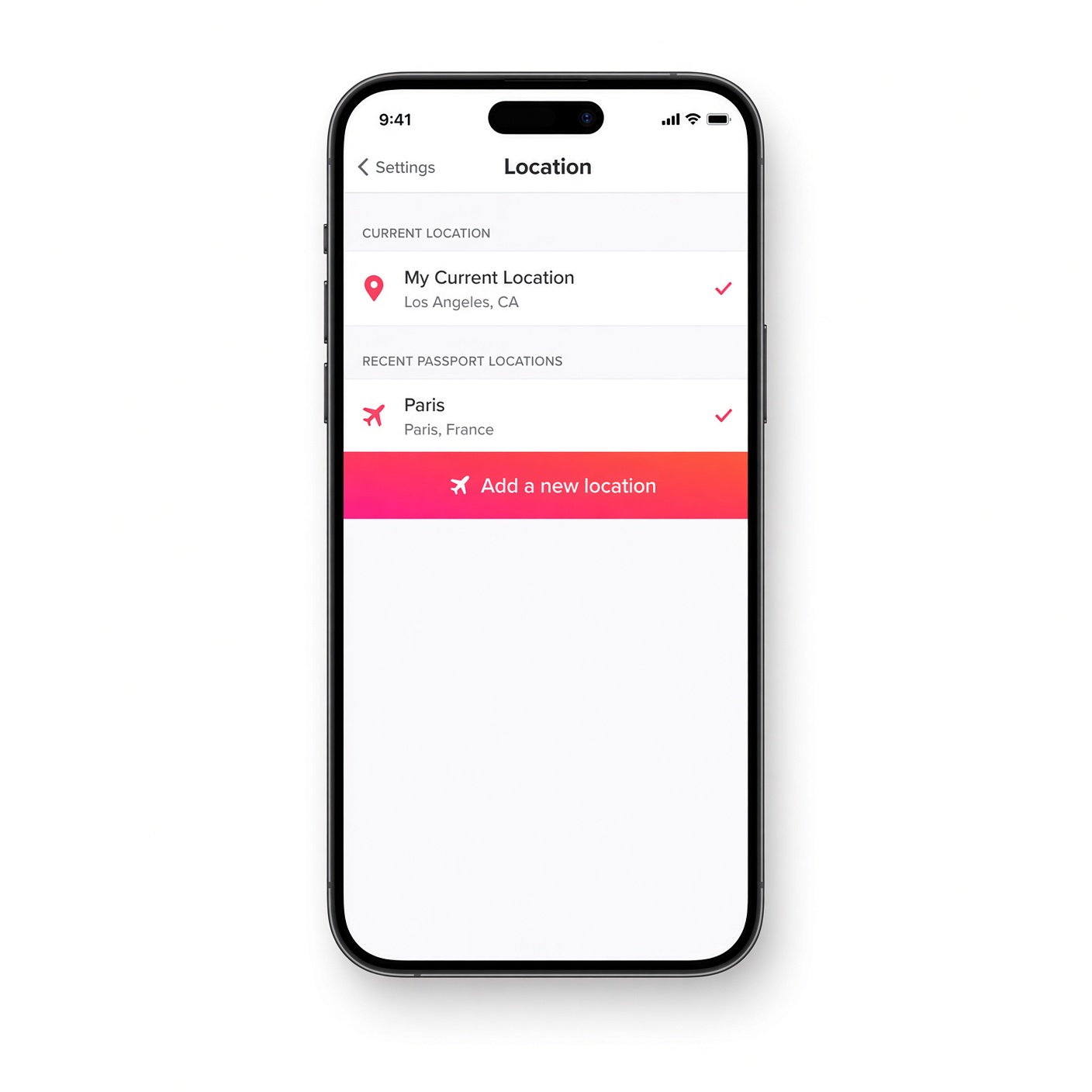
Add a New Location: Tap on “Add a new location” or click directly on the interactive world map provided on the screen.
-
Search and Pin: Use the search bar at the top to type in the city, neighborhood, or country you want to explore (for example, “Paris, France” or “Tokyo, Japan”). Once the location appears in the drop-down menu, tap on it.
-
Confirm Your Choice: Select the option to “Change Location” or pin your spot. Your profile is now virtually relocated!
Once these steps are complete, your discover feed will refresh, and you will instantly begin seeing profiles from your newly chosen destination.
Smart Strategies for Maximizing Your Matches Abroad
Simply changing your location and hoping for the best is rarely enough to get great results. If you want to turn virtual matches into meaningful conversations—and perhaps real dates when you travel—you need a smart approach. Here are some advanced, beginner-friendly strategies to optimize your global profile:
1. Update Your Bio to Reflect Your Travel Plans
Honesty is the best policy in online dating, and it saves everyone a lot of time. When using Tinder Passport, thousands of miles may separate you from your matches. To avoid confusion, clearly state your intentions in your bio.
-
Example: “Visiting Chicago next month!” or “Based in London, but relocating to Miami in July.”When locals see that you have a concrete reason for being interested in their city, they are much more likely to engage in conversation rather than assuming you are just a bot or a spam account.
2. Tailor Your Photos to the Vibe
Visuals matter tremendously on dating apps. If you are swiping in a vibrant, artistic European city, ensure your photos showcase your adventurous, fun, or cultural side. High-quality lighting, a friendly smile, and a mix of close-up portraits and full-body shots go a long way. Make sure your pictures look natural and approachable.
3. Mind the Time Zones
Geography dictates schedules. If you are sitting in Los Angeles and swiping in Sydney, Australia, you are dealing with a massive time difference. Keep this in mind when sending messages. If it is 3:00 AM in Sydney, your match is sleeping, and your message will sit at the bottom of their queue. Match your messaging windows to when people are likely to be scrolling—usually evenings and lunch breaks in your target destination.
Benefits of Using Tinder Passport for Travelers and Explorers

Why do millions of people love using this feature? The advantages go far beyond just looking at pretty pictures of far-off places. Here are the core benefits:
-
Built-in Local Tour Guides: Who knows a city better than the people who live there? Matching with locals before a trip gives you an incredible insider perspective. You can ask for authentic restaurant recommendations, hidden gems away from tourist traps, and advice on safe neighborhoods to visit.
-
Making Friends Before Moving: Relocating for work or school is daunting. Having a network of friendly acquaintances or potential friends established before you unpack your moving boxes can dramatically reduce the stress of moving to a new city.
-
Expanding Cultural Horizons: Even if you never board a plane, talking to people from different cultural backgrounds, countries, and walks of life broadens your worldview. It introduces you to new perspectives, different styles of humor, and fascinating life stories.
-
Saving Time on Vacations: Vacation time is precious. Nobody wants to spend their first three days in a foreign country sitting in a hotel room figuring out where to go. By setting up your connections in advance, you can line up coffee dates, museum visits, or nightlife adventures for your very first night in town.
Common Misconceptions and Myths About Tinder Passport
Because online dating features are often misunderstood, several myths float around internet forums regarding how Tinder Passport operates. Let’s clear up the most common ones so you can swipe with confidence:
-
Myth 1: “People will know I am using Passport immediately.”
-
Reality: While your distance might say “1,500 miles away” or display a special Passport icon depending on the current app update, people will only truly know if you mention it or if they read your bio. Many people love meeting travelers, so it is rarely viewed negatively as long as you are transparent.
-
-
Myth 2: “Using Passport breaks the app’s algorithm.”
-
Reality: Tinder’s algorithm treats Passport locations just like real locations. Your Elo score (the internal rating system Tinder uses to match profiles) travels with you. However, switching locations frequently in a short span can sometimes slow down your queue as the app recalibrates to a massive new pool of users.
-
-
Myth 3: “You can only use it on desktop computers.”
-
Reality: Tinder Passport is fully integrated into mobile devices. You do not need a computer; you can change your location from your smartphone while sitting on your couch, riding the bus, or waiting in line at the grocery store.
-
Privacy, Safety, and Best Practices for Global Swiping
Whenever you share your location or interact with people across international borders, safety should always be your top priority. While the vast majority of dating app users are genuine people looking for connection, friendship, or romance, online spaces require a healthy dose of caution.
-
Protect Your Personal Information: Never share sensitive financial details, your home address, your workplace, or passwords with someone you have only just met online—regardless of how charming or trustworthy they seem.
-
Keep Conversations on the App Initially: There is no rush to move to WhatsApp, Instagram, or text messaging immediately. Take your time getting to know someone through the secure messaging system built directly into Tinder.
-
Verify Through Video Chat: If you plan to meet someone in person during an upcoming trip, always suggest a video call (using FaceTime, Zoom, or the app’s built-in video chat features) before your trip. This ensures that the person matches their photos and that you both feel comfortable with one another.
-
Meet in Public Spaces: If you eventually transition from a digital match to an in-person meeting while traveling, always choose a busy, public venue such as a popular café, restaurant, or hotel lobby. Always let a trusted friend or family member know where you are going and who you are meeting.
Is Tinder Passport Right For You?
Tinder Passport is one of the most powerful and versatile tools in the modern online dating ecosystem. Whether you are an avid jet-setter preparing for your next international adventure, someone planning a major cross-country move, or simply an inquisitive soul looking to chat with interesting people across the globe, this feature opens up a world of possibilities right from the palm of your hand.
By keeping your bio transparent, respecting cultural differences, keeping time zones in mind, and practicing smart digital safety habits, you can turn a simple app feature into an incredible gateway for global connection. Download or update your app, pin your dream destination on the map, and start exploring the world one swipe at a time!