Learn when it’s safe to allow location sharing
Understand when it’s safe to share your location and when to avoid it
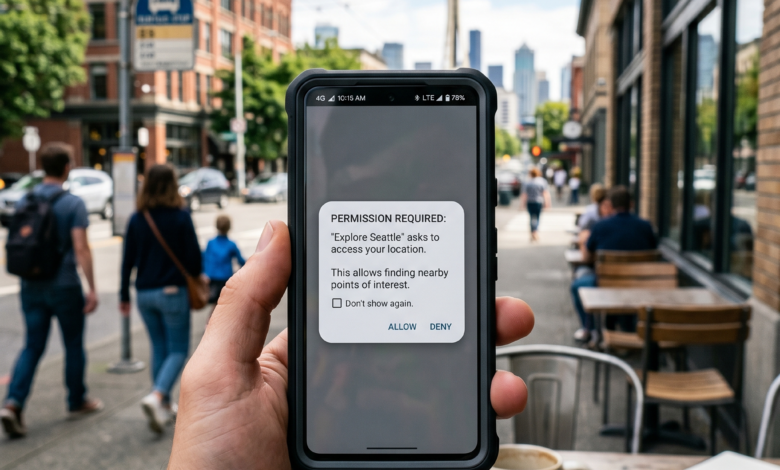
In the modern dating landscape, the first thing almost every app asks you after you download it is: “Allow [App Name] to access your location?” For most users, clicking “Allow” is a reflexive habit. After all, how can you find a match if the app doesn’t know where you are?
However, as we navigate through 2026, the conversation around digital privacy has become more sophisticated. Your location data is one of the most sensitive pieces of information you own. While location services make “proximity matching” possible, they also create a digital trail that can be exploited if not managed correctly.
This comprehensive guide explores the pros and cons of allowing location access, the technical risks involved, and the advanced strategies you can use to stay visible to matches while keeping your physical home address private.
How Proximity Matching Works: The Convenience of Location Services

The primary reason dating apps request location access is to facilitate Proximity Matching. The algorithm uses your GPS coordinates to create a “search radius.” If you set your distance to 10 miles, the app only shows you people whose phones are currently within that circle.
Real-Time Updates vs. Fixed Location
In 2026, most apps use “Background Location.” This means that as you move through the city—going to work, the gym, or a coffee shop—your profile is constantly being updated in the “stacks” of people around you. This real-time synchronization is what allows for “spontaneous” digital connections, such as matching with someone who is currently at the same music festival or professional conference as you.
Without location access, the app effectively breaks. You would be shown people from across the country, making the prospect of a real-life date nearly impossible.
The “Stalker” Risk: How Precise is Your Location Data?
While the convenience is undeniable, the risks are real. Most dating apps do not show your exact coordinates to other users, but they do show your distance. In the hands of a dedicated “bad actor,” this information can be used for Trilateration.
What is Trilateration?
Trilateration is a mathematical process where someone can determine your exact location by checking your distance from three different points.
-
The person sees you are 1 mile away from them at Point A. They draw a circle.
-
They move to Point B and see you are 1.2 miles away. They draw another circle.
-
At Point C, the intersection of these circles reveals exactly where you are standing.
In 2026, many top-tier apps like Tinder and Bumble have implemented “Fuzzy Location” to prevent this. Instead of saying you are “0.8 miles away,” they might say “less than 1 mile” or “nearby.” However, not every app uses these safeguards, making it crucial to know which settings you are enabling.
Privacy Settings: “While Using the App” vs. “Always Allow”
When your phone asks for permission, you usually have three choices. Understanding the difference is vital for your digital safety.
-
Always Allow: The app tracks you 24/7, even when it’s closed. This is the most intrusive option. It allows the app to build a “lifestyle map” of your habits—where you sleep, where you work, and where you spend your weekends. This data is often sold to advertisers.
-
While Using the App: This is the recommended setting for most daters. The app only updates your location when you physically open it to swipe. This gives you control; you can choose to only open the app when you are in a public space, rather than at home.
-
Never: You will have to manually enter your zip code or city. While this is the safest, it often results in your profile being “deprioritized” by the algorithm because it looks like you are an inactive or “stale” user.
The Data Broker Industry: Where Does Your Location Go?
It is a common misconception that only the dating app knows where you are. Most free dating apps generate revenue through Data Monetization.
Your location history is a goldmine for retailers and marketers. If your dating app knows you spend three mornings a week at a specific boutique gym, it can sell that “segment” to supplement companies or athletic wear brands. By 2026, “Hyper-Local Advertising” has become so precise that you might receive a discount notification for a restaurant just because you matched with someone who frequent that same neighborhood.
If you are highly concerned about your consumer privacy, you should check the app’s Privacy Policy specifically for “Third-Party Data Sharing.”
Advanced Strategy: Using “Travel Mode” and “Passport” Safely
For those who want the benefits of location without the risks of real-time tracking, many apps offer Travel Mode or Passport features (usually as part of a paid subscription).
Virtual Relocation
These features allow you to manually set your location to a city center or a specific landmark, even if you are miles away.
-
Benefits: You can start matching in a new city before you arrive.
-
Safety: Since your “location” is a fixed point you chose (like a city park or a downtown monument), nobody can use trilateration to find your actual house.
This is an excellent compromise for users who live in isolated areas and don’t want their neighbors or local community to know exactly which house they live in based on the “0.1 miles away” tag.
How Your Location Impacts Your “Algorithm Rank”
Dating apps are businesses that want to facilitate successful meetups. The algorithm favors users who are “reachable.”
If you allow location access, the app knows you are a “local” user. Profiles that are physically closer to each other have a much higher “Match-to-Date” conversion rate. Consequently, the AI will often push “nearby” users to the top of the deck. If you hide your location or use a VPN to spoof your location, the app may flag your account as “suspicious” or a “bot,” significantly reducing your visibility.
The 2026 Trend: “Incognito” and “Approximate” Location
In response to growing privacy demands, 2026 has seen the rise of Approximate Location settings in iOS and Android.
When you enable this, the app receives a general “neighborhood” view rather than your exact GPS pin. For dating, this is usually sufficient. You can still see people in your city, but the “distance” shown to others will be an estimate based on a larger geographic area.
Pro-Tip: Always check if your dating app supports “Approximate Location.” It is the best way to maintain your “Proximity Matching” benefits without giving away your street address.
Managing Your “Digital Footprint” When Traveling
If you travel frequently, allowing location access can be a double-edged sword. While it’s great for meeting people in new cities, it also leaves a trail of where you’ve been.
-
Airport Safety: Be careful about opening dating apps at the airport or your hotel. This immediately pins your location to a place where you are a “transient” guest, which can make you a target for specific scams.
-
Clear the Cache: Many experts suggest “logging out” or killing the app’s background process once you leave a sensitive location to prevent it from updating your coordinates in a vulnerable spot.
Summary: Location Access Checklist
| Setting | Recommendation | Why? |
| GPS Accuracy | Use “Approximate” | Protects your house number while keeping you local. |
| Permission | “While Using App” | Prevents 24/7 lifestyle tracking and battery drain. |
| Home Base | Use Travel Mode | Best for those who live in small, recognizable neighborhoods. |
| Public Swiping | Open apps in public | Ensures your “last seen” location is a cafe or mall, not your bedroom. |
Should You Click “Allow”?
The answer depends on your personal “Risk vs. Reward” threshold. For 90% of users, allowing location access “While Using the App” is the optimal balance. It ensures the algorithm works correctly, keeps you visible to local matches, and allows for the spontaneity that makes online dating exciting.
However, you should never be a “passive” user of your own data. Regularly audit your location settings, use “Fuzzy Location” whenever possible, and be mindful of where you are when you open the app. Your safety is a combination of the app’s technology and your own digital hygiene.
In the world of 2026, you can be found by “The One” without being found by everyone. Be smart, stay local, and keep your private life exactly that—private.