How to Create a Parship Account
Discover how to register, answer the personality questionnaire, and set up your dating profile
Finding a meaningful, long-term relationship in the digital age requires choosing the right platform—one designed for genuine compatibility rather than endless, superficial swiping. Parship has built a global reputation as a premier online matchmaking service tailored specifically for singles looking for serious, committed partnerships. Built on a scientific personality assessment, the platform takes the guesswork out of online dating by introducing you to people who truly align with your values, lifestyle, and communication style.
If you are ready to get started but feel overwhelmed by the registration process, personality questionnaire, or profile setup, you are in the right place. This comprehensive guide walks you through everything you need to know about how to create a Parship account from start to finish, along with expert tips to optimize your profile, understand membership options, and stay safe while meeting new people online.
What Is Parship and How Does Its Matchmaking System Work?



Before diving into the step-by-step registration process, it helps to understand what sets Parship apart from conventional dating apps. Unlike swipe-based platforms that prioritize quick visual judgments, Parship operates on the Parship Principle—a psychological matching algorithm developed by relationship researchers and psychologists.
When you sign up, you do not just upload a photo and write a two-line bio. Instead, you complete an in-depth personality questionnaire evaluating roughly 80 questions across 32 distinct personality traits. These traits measure emotional stability, sociability, conflict resolution styles, relationship expectations, and lifestyle habits.
Once your assessment is complete, the system calculates a Compatibility Score (typically up to 140 points) between you and other active members. The higher the score, the stronger the psychological harmony between two profiles. Because of this structured approach, creating your account thoughtfully is the single most important step toward achieving great results on the platform.
Requirements Before You Create Your Parship Account
Setting up your profile takes roughly 20 to 30 minutes because of the detailed personality test. Preparing a few essentials beforehand will make the registration process smooth and stress-free:
- A Valid Email Address: You will need an active email address that you check regularly. Parship uses this to verify your account, send match notifications, and deliver security alerts.
- A Strong, Unique Password: Create a password containing at least eight characters, combining uppercase and lowercase letters, numbers, and symbols to keep your personal data secure.
- 20 to 30 Minutes of Uninterrupted Time: Rushing through the personality assessment leads to inaccurate match suggestions. Set aside quiet time so you can answer honestly without distractions.
- 3 to 5 High-Quality Recent Photos: Having clear, well-lit photos ready on your computer or smartphone allows you to complete your visual profile immediately after registration.
- A Clear Idea of Your Relationship Goals: Knowing what values, hobbies, and long-term commitments matter most to you will help you craft compelling written answers on your profile.
Step-by-Step Guide: How to Create a Parship Account
You can register for Parship either through a desktop web browser or by downloading the official mobile app on iOS or Android. Both methods connect to the exact same account and database, meaning you can seamlessly switch between your computer and your phone at any time.
Step 1: Visit the Official Website or Download the App
Open your preferred web browser and navigate to the official Parship website, or open the Apple App Store or Google Play Store on your smartphone and search for Parship. Always verify that you are downloading the official application published by PE Digital GmbH to avoid imitation apps.
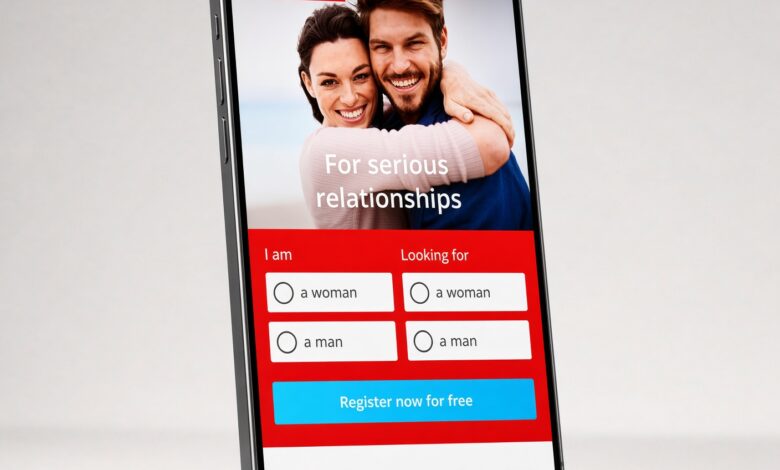
Step 2: Select Your Gender and Partner Preference
On the welcome screen, you will be asked two foundational questions: your own gender and the gender of the partner you are seeking. Select the appropriate options from the drop-down menus or buttons, then click the confirmation button to launch the registration flow.
Step 3: Enter Your Email Address and Create a Password
Next, enter your active email address and choose a secure password. You will also be asked to review and accept Parship’s Terms of Service and Privacy Policy. Take a moment to read through how your data is handled, check the required consent boxes, and proceed to the next screen.
Step 4: Complete the Scientific Personality Assessment
This is the core of your Parship registration. You will be presented with a series of multiple-choice questions, situational scenarios, and visual preference prompts. For example, you might be asked how you handle disagreements, what an ideal weekend looks like, or which abstract images appeal to you most.
- Answer Instinctively: Do not overthink your responses or select answers based on what you think a potential partner wants to hear. Authenticity ensures accurate compatibility scores.
- Avoid Neutral Answers When Possible: Taking a clear stance on preferences helps the algorithm narrow down your best matches.
- Save Progress If Needed: If you need a break, your progress is tied to your registered email, allowing you to log back in and pick up where you left off.
Step 5: Verify Your Email Address
Once you finish the questionnaire, Parship will send an automated verification email to the inbox you provided in Step 3. Open that email and click the confirmation link inside. Verifying your email activates your account, unlocks your initial personality report, and ensures your profile becomes visible to compatible singles. If you do not see the email within five minutes, check your spam or promotions folder.
Step 6: Fill Out Your Basic Personal Details
After verifying your email, you will enter key demographic details that help filter your search results. These typically include:
- Your date of birth (you must be at least 18 years old to join)
- Your city, state, or postal code (used to calculate distance to matches)
- Your height and general lifestyle habits (such as smoking or drinking preferences)
- Your educational background and general profession
- Whether you have children or wish to have children in the future
Step 7: Upload Your Profile Photos
A complete profile needs clear photos so potential matches can put a face to your personality. Upload a primary profile picture along with two to four additional photos showing you in everyday settings. Note that on Parship, newly uploaded photos are initially displayed with a subtle blur to protect member privacy—you decide individually which matches get permission to view your unblurred gallery.
Creating a Parship Account on Desktop vs. Mobile App: Which Is Better?
Many beginners wonder whether it is better to sign up via a computer browser or through the mobile app. While both options grant full access to the same matchmaking pool, each offers distinct advantages during setup.
| Feature | Desktop Web Browser | Mobile App (iOS & Android) |
|---|---|---|
| Personality Test Comfort | Larger screen makes reading 80+ questions faster and easier | Convenient for completing in short bursts on the go |
| Photo Uploading | Requires transferring phone photos to your computer first | Direct, instant access to your smartphone camera roll |
| Writing Bio Prompts | Full keyboard makes writing thoughtful answers effortless | Mobile typing can feel slower for longer responses |
| Daily Messaging & Alerts | Great for long, detailed introductory messages | Push notifications alert you instantly to new messages |
Pro Tip: Complete your registration and personality test on a desktop or laptop computer for maximum comfort, then download the mobile app and log in with your credentials to upload photos directly from your phone and manage daily messages.
How to Optimize Your Parship Profile for Better Matches
Creating an account gets you through the door, but optimizing your profile determines how many quality conversations you start. Follow these proven best practices to stand out naturally:
1. Choose Photos That Tell a Story
Your main photo should be a warm, genuine headshot taken in natural daylight where your face is clearly visible—skip sunglasses, heavy filters, or group shots for your primary image. Use your secondary photos to highlight your lifestyle, such as hiking outdoors, cooking, traveling, or enjoying a hobby.
2. Write Specific, Engaging Prompt Answers
Parship provides open-ended profile questions designed to spark conversation. Avoid generic clichés like “I love to laugh and travel.” Instead, share specific details that give someone an easy opening line. For instance, write: “I spend Sunday mornings testing new pour-over coffee beans and hunting for vintage vinyl records.” Specific details attract people with shared interests and make messaging effortless.
3. Keep Your Tone Positive and Forward-Looking
Focus on what excites you about life and what you bring to a relationship rather than listing past frustrations or rigid dealbreakers. Profiles framed around warmth, curiosity, and shared experiences consistently receive higher response rates.
4. Set Realistic Search Filters
Inside your match preferences, you can filter potential partners by age range, maximum distance, height, education, and family plans. Start with moderately broad filters so you do not accidentally filter out highly compatible matches who live just a few miles outside your initial radius.
Free Basic Membership vs. Paid Premium Membership: What to Expect

Creating a Parship account and completing the personality assessment is completely free. However, understanding what is included in the free tier versus a paid Premium subscription helps you decide how you want to use the service.
- Free Basic Membership: Allows you to create your account, complete the full 80-question personality test, receive a summary of your personality profile, browse your list of compatible match suggestions, and send initial “Icebreakers” or likes. However, free members have strict limits on reading and replying to personalized text messages and viewing unblurred photos.
- Paid Premium Membership: Unlocks unlimited messaging with all matches, full access to your detailed personality analysis report, the ability to view unblurred photos once granted permission, regional search filters, and guaranteed contact minimums depending on the plan duration (typically 6, 12, or 24 months).
If you are unsure about subscribing right away, start with the free basic account. Explore your match list, examine the compatibility scores in your area, and upgrade only once you see active profiles you genuinely want to converse with.
Essential Online Dating Safety and Privacy Tips for New Users
While Parship manually reviews new profiles and uses encryption to protect user data, practicing smart digital habits keeps your experience safe and enjoyable from day one:
- Keep Conversations on the Platform Initially: Use Parship’s built-in messaging system until you build genuine trust. Avoid sharing your personal phone number, home address, or social media handles in your first few messages.
- Take Advantage of Photo Privacy Controls: Remember that your photos remain blurred to other users until you explicitly release them to a specific match. Only unlock your gallery for people who show respectful, genuine interest.
- Never Send Money or Financial Information: Legitimate matches will never ask for financial help, gift cards, investment advice, or bank details. Report and block any account that brings up money immediately.
- Plan First Dates in Public Places: When you decide to meet in person, choose a busy coffee shop, restaurant, or public park during daytime or early evening hours, and arrange your own transportation to and from the venue.
Troubleshooting Common Parship Account Registration Issues
If you run into a snag while creating your account, most issues can be resolved in less than two minutes:
- Verification Email Never Arrived: Check your spam, junk, or promotions folder first. Ensure there were no typos in the email address you entered. If nothing appears after 10 minutes, request a new confirmation link from the login screen.
- Password Rejected During Setup: Make sure your password meets all security criteria—avoid using your name, birth year, or common dictionary words, and include at least one uppercase letter and one number.
- Profile Photo Rejected: Parship’s moderation team reviews every uploaded photo. Images containing nudity, offensive gestures, contact information, watermarks, or blurry low-resolution pixels will be declined. Upload a sharp, well-lit solo photo instead.
- Forgot Login Credentials Midway Through Setup: If you closed your browser before finishing the questionnaire, simply click “Forgot Password” on the Parship homepage, enter your registered email, and reset your password to resume your session.
Final Thoughts on Getting Started With Parship

Learning how to create a Parship account is straightforward once you know what to expect. By setting aside half an hour to answer the personality questionnaire honestly, uploading clear and welcoming photos, and writing thoughtful profile prompts, you give the matchmaking algorithm everything it needs to connect you with genuinely compatible partners. Start with a free account today, explore your matches at your own pace, and take a confident first step toward building a lasting relationship.