How to Improve Your Tagged Profile
Learn how to choose better photos, write an engaging bio, and make your Tagged profile more appealing

Why Optimizing Your Tagged Profile Matters for More Matches



Tagged operates differently from traditional swipe-only dating apps. It blends social networking features, live streaming, interest-based discovery, and interactive games like Pets into a single ecosystem. Because there are so many ways for users to stumble across your account, an unoptimized profile leaves massive opportunities on the table.
When someone visits your page, they subconsciously evaluate trustworthiness, personality, and shared interests within seconds. Profiles with clear visuals, well-written descriptions, and active engagement signals are favored both by human visitors and by the platform’s internal discovery feeds. When you take the time to polish every section of your account, you stop blending into the background and start appearing in front of people who actually want to connect.
Choosing the Best Profile Photos for Tagged
Your photos do heavy lifting before anyone reads a single word of your bio. On a fast-moving social platform, visual clarity and authenticity determine whether a visitor taps to learn more or hits the back button.
Lead With a Clear, Smiling Headshot
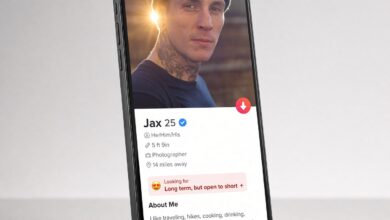
Your primary profile picture should feature only you, framed from the chest or shoulders up. Natural daylight works wonders compared to harsh indoor overhead lighting or heavy flash. Make sure your face is clearly visible without sunglasses, hats that cast shadows over your eyes, or distracting hand gestures. A genuine, relaxed smile immediately makes you look approachable and trustworthy, encouraging other users to start a conversation.
Show Your Lifestyle and Hobbies Through Variety
Once your main photo grabs their attention, your secondary photos should tell a story about who you are outside of your living room. Aim for a balanced mix of four to six high-resolution images that showcase different sides of your daily life:
- A full-body shot: Wearing an outfit you feel confident in gives visitors an honest, complete sense of your style and appearance.
- An action or hobby photo: Whether you are hiking, cooking, playing an instrument, or attending a concert, activity photos give people an effortless excuse to message you about shared passions.
- A travel or outdoor picture: Candid shots taken in interesting locations naturally invite questions about where you have been and where you want to go next.
- A dressed-up look: Including one photo from a wedding, dinner party, or night out shows versatility and effort.
Photo Mistakes That Instantly Hurt Your Profile
Even great people get ignored when their photo gallery sends the wrong signals. Avoid uploading blurry, pixelated screenshots, photos taken in messy bedrooms or bathroom mirrors, and pictures heavily altered with beauty filters. Group shots can also backfire if visitors cannot immediately tell which person you are. If you include a photo with friends, save it for the fourth or fifth slot in your gallery—never make it your main image.
How to Write a Tagged Bio That Sparks Conversations
After looking at your pictures, interested visitors will scan your bio to see if your personality matches your appearance. One of the biggest mistakes users make is leaving the “About Me” section blank or writing generic clichés like “Just ask” or “Here to see what happens.” Those phrases give people zero material to work with when trying to write an opening message.
Use the Hook, Personality, and Call-to-Action Formula
A compelling Tagged bio does not need to be an essay. Three to four well-crafted sentences are enough to stand out if you structure them intentionally:
- The Hook: Start with an intriguing detail, a lighthearted observation, or a specific passion that sets you apart from the crowd.
- Your Core Vibe: Share two or three concrete things you enjoy doing on weekends, your favorite food, or what makes you laugh. Specific details like “hunting down the best street tacos” are infinitely better than saying “I love food.”
- The Conversation Starter: End your bio with a low-pressure question or prompt that makes it effortless for someone to message you first.
Examples of High-Converting Tagged Bios
If you are stuck staring at a blank text box, use these templates as inspiration and customize them to fit your real personality:
- The Adventurous Type: “Weekend road-tripper, amateur coffee snob, and proud dog parent. When I’m not exploring new hiking trails, I’m usually trying to recreate recipes I saw online. Tell me your go-to karaoke song or your favorite local hidden gem.”
- The Laid-Back Homebody: “Big fan of rainy Sunday movie marathons, board game nights, and terrible dad jokes. Looking for good conversation, genuine laughs, and someone to debate whether pineapple belongs on pizza. What are you currently binge-watching?”
- The Ambitious Socialite: “Building my career by day and hunting for the best live music spots by night. I value loyalty, humor, and people who don’t take life too seriously. Drop your best travel recommendation in my inbox.”
Completing Every Profile Detail and Interest Tag
Tagged allows you to fill out specific background details, relationship preferences, and interest tags. Skipping these fields might seem harmless, but incomplete profiles often perform poorly in search filters and discovery algorithms.
When other members filter their searches by age, location, relationship goals, or shared interests, empty fields can quietly exclude you from their results. Take ten minutes to fill in your education, occupation, languages spoken, and what you are looking for on the platform. Being upfront about whether you want casual chats, new friends, or a serious relationship saves time and attracts people who are aligned with your expectations.
Tagged Profile Optimization Checklist: Weak vs. Strong
Reviewing your profile side-by-side against best practices makes it easy to spot quick wins. Use the comparison table below to audit your current setup and identify areas ready for an upgrade.
| Profile Element | Common Mistakes (Low Engagement) | Optimized Approach (High Engagement) |
|---|---|---|
| Main Profile Photo | Sunglasses on, dark lighting, cropped group photo, or heavy filters | Clear solo headshot in natural light with a genuine, welcoming smile |
| Photo Gallery | Only 1 or 2 selfies taken from the exact same angle | 4 to 6 varied photos showing hobbies, full-body style, and social settings |
| About Me Bio | Left completely blank or filled with “Just ask” and generic clichés | Short, specific summary of hobbies plus an easy question to answer |
| Profile Details | Missing location, vague intentions, and unchecked interest tags | 100% completed fields with accurate city, clear goals, and specific interests |
| Account Activity | Logging in once a month and waiting passively for messages | Consistent weekly logins, active browsing, and thoughtful first messages |
Using Tagged Features to Boost Your Profile Visibility
A polished profile only works if people actually see it. Tagged offers built-in community features designed to put active users front and center across the platform.
Stay Active in Meet Me and Browse
Social discovery platforms reward consistent engagement. Logging in regularly—even for ten minutes a day—signals to the platform that your account is active and responsive. Users who frequently browse profiles, vote in “Meet Me,” and respond promptly to incoming messages tend to receive higher visibility in discovery feeds compared to dormant accounts.
Explore Tagged Pets and Interest Communities
One of Tagged’s signature features is the Pets game, alongside live streams and topic-based communities. Participating in these interactive spaces is a low-pressure way to get your profile in front of active members without relying solely on cold messaging. When people interact with you in a game or live chat, they naturally click through to check out your profile—giving your newly upgraded photos and bio a chance to shine.
Verify Your Account for Instant Credibility
Online dating and social apps require trust. Completing any available profile verification steps reassures visitors that you are a real person and not a bot or fake account. Verified badges act as immediate social proof, making users far more comfortable replying to your messages or initiating contact themselves.
Sending Better First Messages to Match Your Upgraded Profile

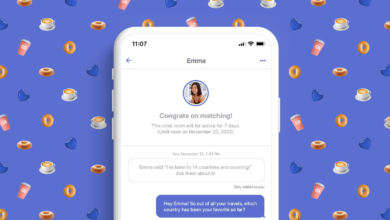
Improving your Tagged profile will bring more visitors to your page, but your messaging habits determine how many of those views turn into real conversations. Once someone visits your profile or matches with you, avoid sending one-word openers like “Hey,” “Hi,” or “What’s up?” Those messages get buried in busy inboxes.
Instead, glance at their photos or bio and mention one specific detail you noticed. You might ask about a concert t-shirt they are wearing, compliment their pet, or comment on a shared favorite show. Combining a strong, authentic profile with thoughtful, personalized messages creates momentum that sets you apart from the vast majority of users on the platform.
Staying Safe While Growing Your Connections on Tagged
As your profile visibility increases and more people reach out, maintaining smart online safety habits protects your time and personal information. Keep your conversations inside the Tagged app until you have built genuine rapport and feel comfortable moving elsewhere. Never share sensitive personal details—such as your home address, workplace, financial information, or private identification—with someone you have just met online.
If an account pushes you too quickly to move off the platform, asks for money or gift cards, or uses photos that seem overly staged and inconsistent, trust your instincts and use Tagged’s built-in block and report tools. A great social experience is built on mutual respect, clear boundaries, and authentic interactions.
Frequently Asked Questions About Improving a Tagged Profile
How many photos should I upload to my Tagged profile?
Aim for four to six high-quality photos. Having fewer than three can make your profile look incomplete or suspicious, while uploading dozens of repetitive selfies dilutes your best shots. Choose images that each highlight a different aspect of your personality, lifestyle, or appearance.
Does updating my bio and photos really increase profile views?
Yes. Refreshing your photos, updating your bio, and logging in consistently signals active participation on the platform. Furthermore, a clearer main photo dramatically improves the percentage of users who click on your profile when they see your thumbnail in search results or the Meet Me feed.
What should I write in my Tagged bio if I am shy?
Keep it simple, honest, and focused on your favorite low-key interests. Mention a couple of hobbies you genuinely enjoy—like reading, gaming, cooking, or walking your dog—and end with an easy question such as, “What is the best movie you have seen recently?” You do not need to write anything flashy to attract the right people.
Why am I getting profile views on Tagged but no messages?
High profile views paired with low messages usually mean your main photo is doing a great job attracting clicks, but your bio or secondary photos are not giving visitors an obvious reason to start a conversation. Adding a specific question or fun prompt at the end of your bio gives visitors an effortless opening line.