Can Someone Hack Your Phone Through a Text Message?
Discover how malicious links and phishing messages can put your device at risk
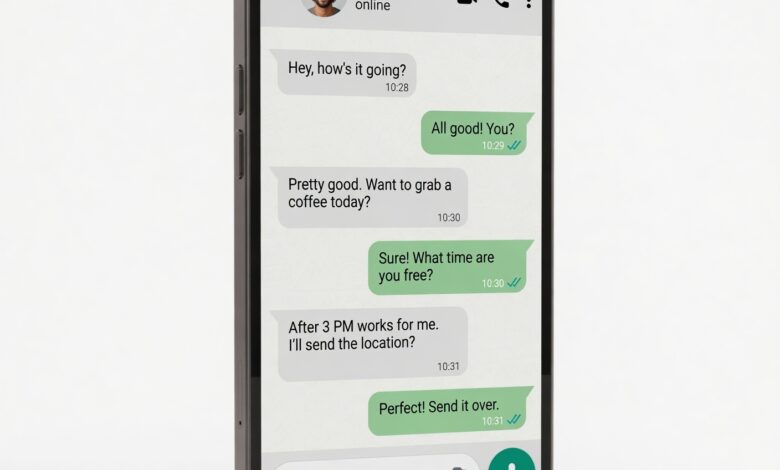
In an age where our smartphones are extensions of our personal, financial, and professional lives, the fear of being “hacked” is a constant, nagging concern. We receive dozens of notifications daily, and every so often, a strange text message appears, prompting us to click a link or verify an account. This inevitably leads to the question: Can someone actually hack your phone just by sending you a text?
The short answer is: It’s complicated, but you are the most important line of defense.
While it is true that modern smartphones are incredibly secure, they are not invincible. Hackers are constantly evolving their methods, moving from simple scams to highly sophisticated technical exploits. In this guide, we will explore the reality of SMS-based threats, how they work, and most importantly, how you can lock down your device against them.
The Reality of Smishing: What Is It?

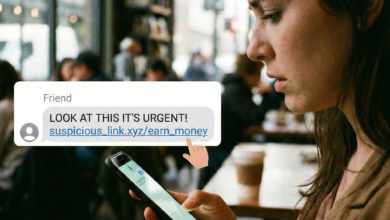
“Smishing”—a portmanteau of SMS and phishing—is the most common way hackers use text messages to compromise your security. Unlike a technical “hack” where code is injected into your phone behind your back, a smishing attack relies on social engineering.
The attacker isn’t hacking your phone’s hardware; they are hacking you. They manipulate your emotions—fear, curiosity, or greed—to convince you to take an action that compromises your own security.
-
The Lure: You receive a text that looks like it’s from your bank, a delivery service (like UPS or FedEx), or a government agency.
-
The Urgency: The message claims your account is locked, a package delivery has failed, or there is an urgent security alert.
-
The Trap: You are directed to click a link. That link leads to a fake, lookalike website designed to steal your login credentials, credit card numbers, or personal identity information.
Key Takeaway: In 99% of cases, you are not “hacked” just by receiving or opening the text. You are only compromised if you interact with the content—the links, the attachments, or the request for information.
Can You Be Hacked Without Clicking Anything? (The “Zero-Click” Reality)
You may have heard news reports about “zero-click” exploits. These are the “Holy Grail” of cyberattacks, and they are genuinely scary. A zero-click attack can, in theory, compromise a device without the user ever touching the screen.
What Is a Zero-Click Attack?
In these rare, highly sophisticated scenarios, an attacker sends a message—often through SMS, MMS (multimedia messaging), or messaging apps like WhatsApp—that triggers a vulnerability in your phone’s software automatically. The phone processes the message, the hidden code executes, and the hacker gains access.
Should you be worried?
For the average person, no. These attacks are expensive to develop and are typically used by state-sponsored actors or professional cyber-espionage groups to target high-profile individuals like journalists, activists, and government officials. They are not used to steal your Netflix password or your tax refund. The sheer technical difficulty and cost required to pull off a zero-click attack make them highly unlikely for a casual scammer.
How to Identify a Smishing Text Message
Cybercriminals are getting better at crafting messages that look legitimate. However, they almost always leave “tells” if you know where to look. Use this checklist to evaluate every unexpected message:
-
The “Urgent” Trigger: If the text creates a sense of panic (e.g., “YOUR ACCOUNT WILL BE SUSPENDED IN 1 HOUR”), it is almost certainly a scam. Legitimate organizations rarely use high-pressure, threatening language.
-
Generic Greetings: If a text from your “bank” says “Dear Customer” rather than using your actual name, delete it. Your bank knows who you are.
-
Odd Links: Long, nonsensical, or shortened URLs (like
bit.ly/xyz123) in a text message are a major red flag. If you are ever unsure, don’t click the link. Go to the service’s official website or app separately to check your account status. -
Grammar and Spelling: Look for missing words, weird punctuation, or awkward phrasing. Professional companies invest heavily in proofreading their customer communications.
-
Unexpected Requests: No legitimate business will ever ask you to verify your password, credit card number, or social security number via a link in a text message.
What Happens If You Do Reply or Click?
If you accidentally respond to a scam text, don’t panic. Replying alone usually won’t give them control of your phone. However, here is what likely happens:
-
You Confirm You’re a Target: By responding, you prove that your phone number is active and that you are willing to engage. Your number will be flagged as a “hot lead,” and you will likely see a massive increase in spam calls and scam texts.
-
Data Harvesting: If you click the link and enter information, the scammers now have your credentials. They can use these to empty your accounts, steal your identity, or sell your data on the dark web.
-
Malware Installation: In some cases, clicking a link or downloading an MMS attachment can trigger a file download. If you are prompted to install an “app” or a “security update” from the link, do not do it.
Proactive Steps: How to Harden Your Phone
You don’t need to be a tech expert to make your phone a difficult target. Follow these steps to significantly reduce your risk of a successful attack.
1. Enable Built-in Spam Filters
Both iOS and Android have powerful, built-in tools that automatically identify and filter out suspected spam messages.
-
For iPhone: Go to Settings > Messages and enable “Filter Unknown Senders.” This moves texts from non-contacts into a separate list.
-
For Android: Open the Messages app > Settings > Spam protection and ensure it is turned on. This automatically flags and blocks known scam numbers.
2. Disable Automatic MMS Downloads
MMS messages (which include photos and videos) are the preferred vehicle for malware delivery.
-
In your messaging app settings, look for an option that says “Auto-download MMS” and turn it off. This ensures that a malicious file won’t execute just by arriving in your inbox; you’ll have to manually tap it first.
3. Use Two-Factor Authentication (2FA) Everywhere
Even if a hacker steals your password, 2FA is your safety net. By requiring a second form of verification (like an app-based code), you prevent them from accessing your account from a new device. Avoid using SMS-based 2FA if possible, as hackers can sometimes perform “SIM swapping” to intercept your text codes. Instead, use an authenticator app like Google Authenticator, Authy, or a hardware security key.
4. Keep Your Operating System Updated
This is the single most effective way to prevent technical hacks. Software updates contain “patches” that fix the very vulnerabilities hackers look to exploit. If your phone says an update is available, install it immediately.
5. Be Skeptical of “Tech Support” Texts
If you get a text from “Apple Support” or “Google Support,” it is almost certainly a scam. These companies do not text you regarding account issues. If you have a problem, initiate the support request yourself through their official websites.
Signs Your Phone Might Be Compromised
If you suspect you did click something you shouldn’t have, look for these warning signs:
-
Unexplained Battery Drain: Malware running in the background uses a lot of processing power, which drains your battery quickly.
-
Overheating: If your phone feels hot when you aren’t using it, something might be running in the background.
-
Data Spikes: Check your data usage in settings. If there is a huge, unexplained spike, malware might be sending your personal information back to a hacker’s server.
-
Strange Pop-ups: If you see intrusive ads or pop-ups that appear outside of your browser or apps, you likely have adware or malicious software installed.
-
Unfamiliar Apps: Go through your list of installed apps. If you see something you don’t remember downloading, delete it immediately.
What to Do If You’ve Been Hacked
If you are convinced your device has been compromised, don’t wait. Take these steps:
-
Disconnect: Turn on Airplane Mode to stop the device from communicating with the hacker’s servers.
-
Delete Suspicious Apps: Go to your settings and remove any app you don’t recognize.
-
Change Your Passwords: Using a clean, different device, change the passwords for your email, banking, and social media accounts.
-
Run a Security Scan: Use a reputable mobile security app (like Google Play Protect for Android or a dedicated security suite) to perform a full system scan.
-
Factory Reset: If you suspect a serious infection, a factory reset is the “nuclear option.” It will wipe your phone clean and restore it to its original settings. Make sure you have your files backed up to the cloud first.
Awareness is Your Best Armor
The vast majority of “phone hacking” stories you hear are not the result of super-spies breaking into your device, but rather the result of everyday people being tricked by clever, high-pressure scams.
By treating every text message with a healthy dose of skepticism, keeping your software updated, and using tools like two-factor authentication, you make yourself an incredibly difficult target. Remember: Your phone is a powerful tool, but you are the administrator. If a text looks suspicious, the safest action is always the simplest one—delete it.