What Happens When You Click a Malicious Link?
Learn what can happen after clicking a dangerous online link

It happens in the blink of an eye. You receive an email that looks like a shipping notification, a text message about a suspicious bank login, or a direct message from a “friend” on social media. Your finger hovers over the link, curiosity or urgency takes over, and—click.
In that split second, a chain reaction begins. For many, the fear is immediate: “Is my computer ruined? Did they just steal my password?” For others, nothing seems to happen at all, which is often far more dangerous. In the digital landscape of 2026, malicious links are no longer just about flashy pop-ups or obvious viruses; they are the entry points for sophisticated, multi-layered attacks that can compromise your identity, your finances, and your privacy for years to come.
This comprehensive guide breaks down the invisible mechanics of a malicious click, the various ways hackers exploit your curiosity, and the exact steps you need to take to protect yourself.
The Anatomy of a Malicious Link: More Than Just a URL
To the untrained eye, a link is just a string of blue text. However, to a cybercriminal, a link is a delivery vehicle. Understanding what makes a link “malicious” is the first step in building your digital defenses.
Most malicious links are designed to look legitimate through a process called URL Masking. This can take several forms:
-
Typosquatting: Creating a domain that is one letter off from a famous site (e.g.,
g00gle.comorfaceb0ok.com). -
Subdomain Deception: Using a trusted name as a prefix (e.g.,
paypal.security-update.com). In this case, the real domain issecurity-update.com, not PayPal. -
Link Shorteners: Services like Bitly or TinyURL are helpful for character limits, but they also hide the final destination, making them a favorite for scammers.
When you click, you aren’t just “going to a website.” You are sending a request from your device to a server. That server then responds by sending data back to your browser. If that server is controlled by a bad actor, that data exchange becomes a weapon.
The Split-Second Reaction: What Your Browser Does When You Click
When you click a link, your browser (Chrome, Safari, Firefox, or Edge) performs a series of rapid-fire actions. First, it performs a DNS Lookup to find the IP address of the website. Once connected, the browser begins downloading the site’s code—HTML, CSS, and JavaScript.
If the link is malicious, the “payload” is delivered during this loading process. There are three primary ways this harms you:
-
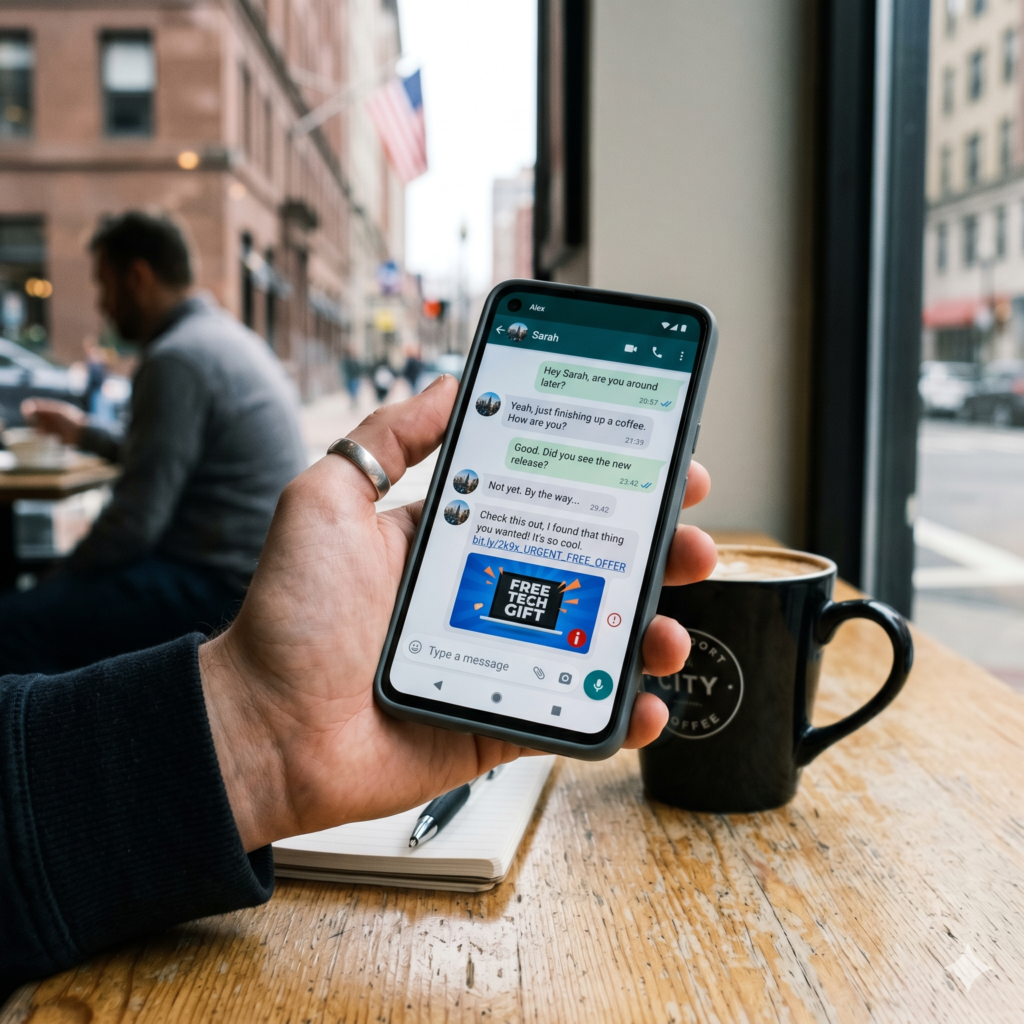
Redirection Chains: You might click a link for a “Free Gift Card,” but before you land on a page, your browser is silently bounced through five or six different servers. Each “stop” on this chain can drop a tracking cookie or scan your browser for vulnerabilities.
-
Exploit Kits: These are automated programs on the malicious server that silently probe your browser and operating system. They look for “holes” (unpatched security flaws). If they find one, they can force your computer to execute code without you ever clicking a “Download” button.
-
Data Harvesting: The link might simply lead to a pixel-perfect replica of a login page you trust. This isn’t about “hacking” your computer; it’s about hacking you.
The “Drive-By” Infection: Why You Don’t Even Have to Download Anything
One of the most persistent myths in cybersecurity is the idea that “as long as I don’t download a file, I’m safe.” In 2026, this is dangerously incorrect. Drive-by downloads are a method where malicious software is installed on your device simply because you viewed a webpage.
How is this possible? It exploits the way browsers handle media and scripts. A malicious link can lead to a page that contains a hidden “iframe”—an invisible window—that initiates a download in the background. Because modern internet speeds are so high, a 2MB piece of spyware can be onto your hard drive before the main page has even finished rendering its “Welcome” message.
Once the file is on your system, it may not act immediately. Many modern viruses are “fileless” or “delayed-action,” waiting for a specific trigger, like you opening your banking app, before they begin their work.
Phishing vs. Malware Downloads: Two Paths to the Same Disaster
While the technical mechanics of a click are fascinating, the intent of the attacker usually falls into two categories: Phishing or Malware Delivery.
The Phishing Path
Phishing is a game of deception. The link takes you to a “Credential Harvesting” site. These sites are designed to look exactly like Microsoft 365, Amazon, or your local bank.
-
The Goal: To get you to type in your username and password.
-
The Result: The moment you hit “Login,” your credentials are sent to the attacker’s database. They then use those credentials to lock you out of your account, steal your funds, or pivot to your workplace network.
The Malware Delivery Path
This path is more direct and aggressive. The link is a shortcut to an executable file or a script.
-
The Goal: To gain “Persistence” on your device.
-
The Result: This could lead to Ransomware (locking your files until you pay a fee), Spyware (monitoring your webcam and keystrokes), or Adware (flooding your device with unclosable advertisements).
Social Engineering: Why We Click Even When We Know Better
If malicious links are so dangerous, why do millions of people still click them every day? The answer lies in Social Engineering—the psychological manipulation of human emotions. Attackers focus on four primary triggers:
-
Urgency: “Your account will be deleted in 2 hours if you do not verify your identity.” This triggers a fight-or-flight response, bypassing our logical thinking.
-
Fear: “A lawsuit has been filed against you. Click here to view the court documents.” Fear is the most effective tool for clouding judgment.
-
Greed/Curiosity: “You’ve won a $1,000 Amazon gift card!” or “See who was talking about you in this video.” We are naturally curious and attracted to gain.
-
Authority: An email that appears to come from your CEO or the HR department. We are conditioned to follow instructions from people in positions of power.
By combining these triggers with a malicious link, attackers create a “perfect storm” that leads even tech-savvy individuals to make a mistake.
Beyond the Desktop: The Rise of Smishing and QR Code Scams
In 2026, the battleground has shifted from the computer screen to the palm of your hand. Mobile devices are now the primary targets for malicious links for one simple reason: it is harder to inspect a link on a smartphone.
Smishing (SMS Phishing)
You’ve likely received a text about a “missed delivery” or a “problem with your Netflix subscription.” Because people trust text messages more than emails, smishing has a much higher success rate. On a phone, you can’t “hover” your mouse over a link to see the real URL, making it incredibly easy to hide the destination.
Quishing (QR Code Phishing)
QR codes are everywhere—in restaurants, on parking meters, and in advertisements. “Quishing” involves stickers placed over legitimate QR codes. When you scan the code to pay for parking, you are actually sent to a fake payment portal that steals your credit card information. Since a QR code is just a visual link, your brain has no way of “reading” it to see if it’s dangerous before you scan.
The Hidden Ripple Effect: What Happens to Your Data on the Dark Web
Let’s say you clicked a link and entered your email and password into a fake site. You realize the mistake ten minutes later and change your password. Are you safe?
Not necessarily. The “Initial Access Broker” (the person who created the fake link) often sells your “log” to other criminals on the Dark Web. Even if you change your password, they now have:
-
Your email address (for future, more targeted attacks).
-
Your IP address (which gives a general idea of your location).
-
Your browser “fingerprint” (which can be used to bypass some security filters).
If you used the same password on other sites (recycled passwords), the attackers will use automated “Credential Stuffing” bots to try that email/password combination on hundreds of other platforms, from your Starbucks app to your healthcare portal.
AI-Generated Links: The New Threat Landscape of 2026
As we navigate 2026, Artificial Intelligence has changed the game. Hackers are now using AI to create Hyper-Personalized Phishing.
In the past, you could spot a malicious link because the email was full of typos or sounded “off.” Today, AI can scrape your public social media profiles to see that you recently attended a specific conference or bought a new car. It can then generate a perfectly written email with a link that feels 100% relevant to your life.
Furthermore, AI is being used to create “Chameleon URLs” that change their appearance and destination based on who is clicking. If a security researcher clicks the link, it shows a harmless cat video. If you click the link from your home IP address, it delivers the malware. This makes it incredibly difficult for traditional antivirus software to keep up.
Digital Emergency Protocol: What to Do Immediately After a Wrong Click
If you realize you’ve just clicked a suspicious link, don’t panic. Speed is your best friend. Follow this “Digital First Aid” protocol:
-
Disconnect Immediately: Turn off your Wi-Fi or unplug your ethernet cable. If malware is trying to “phone home” or upload your files, cutting the connection can stop it in its tracks.
-
Scan with Reputable Software: Use a trusted antivirus and anti-malware tool to perform a deep scan of your system. Look for anything added in the last hour.
-
Change Credentials (from a different device): Do NOT change your passwords on the potentially infected computer. Use your phone (on cellular data, not the same Wi-Fi) to change your primary passwords—starting with your email and banking accounts.
-
Enable Multi-Factor Authentication (MFA): If you don’t have MFA on, turn it on now. This ensures that even if they have your password, they can’t get into your account without a physical code from your phone.
-
Monitor Your Accounts: Keep a close eye on your bank statements and “Recent Activity” logs on social media for the next 48 to 72 hours.
Creating a Human Firewall: Building Better Digital Habits
No software in the world is as effective as a well-trained human brain. To stay safe in an age of malicious links, you must adopt a “Zero Trust” mindset.
-
Inspect Before the Click: On a computer, hover your mouse over a link. Look at the bottom-left corner of your browser to see the real address. If it looks like a jumble of random letters or a weird domain, don’t click.
-
The “Go Direct” Rule: If you get an email from “Amazon” saying there’s a problem, don’t click the link in the email. Instead, open your browser, type
amazon.commanually, and check your notifications there. -
Use a Password Manager: Password managers don’t just store passwords; they protect you from phishing. If you land on a fake site, the password manager won’t recognize the URL and won’t “Auto-fill” your credentials. This is a massive safety net.
-
Keep Everything Updated: Those annoying “System Update” notifications are usually security patches. When you ignore them, you leave the “doors” of your browser wide open for exploit kits.
Awareness is the Ultimate Antivirus
The internet is a vast, interconnected web of billions of links. Most of them are helpful, informative, and essential to our lives. But as we’ve explored, a single malicious link can serve as a bridge for cybercriminals to enter your private world.
By understanding the mechanics of how these links work—from the drive-by downloads to the psychological triggers of social engineering—you move from being a potential victim to an informed user. In 2026, cybersecurity isn’t just about having the best software; it’s about maintaining a healthy level of skepticism and understanding that in the digital world, a split-second of caution is worth a lifetime of protection.
Stay vigilant, stay updated, and always think twice before you click.
Quick Checklist: Is This Link Safe?
| Feature | Safe Indicator | Warning Sign |
| Domain Name | brand.com |
brand-support-info.net |
| Urgency | Informational tone | “Act now or lose access!” |
| Sender | Verified email address | Random string of characters |
| Hover Text | Matches the link text | Completely different URL |
| HTTPS | Padlock icon present | “Not Secure” warning |
Found this guide helpful? Share it with your family and colleagues to help build a safer internet for everyone. Your privacy is your most valuable asset—protect it.