Online Safety
What Happens If You Forget Your Bitwarden Master Password?
Learn whether a forgotten Bitwarden master password can be recovered and what you can do if you lose access
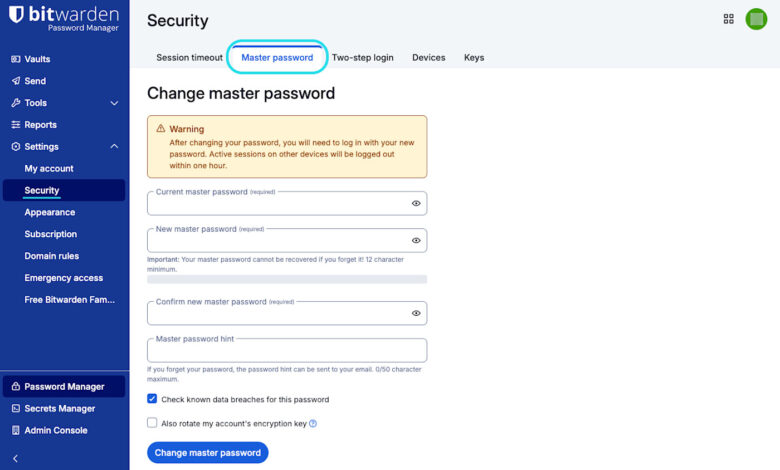
Picture this: you turn on your computer, grab your morning coffee, and sit down to check your emails or log into your bank account. You open up your trusted password manager, Bitwarden, and suddenly realize your mind has gone completely blank. You type in a few combinations, but nothing works. The dreaded red error message pops up: invalid credentials.
Panic sets in. What happens now? Are all my stored passwords gone forever? Can customer support reset it for me?
If you are currently experiencing this nightmare, or if you simply want to prepare for the worst-case scenario, this article will walk you through everything you need to know about losing your Bitwarden master password, how the system’s architecture handles this emergency, and what steps you can take right now.
Understanding Bitwarden’s Zero-Knowledge Architecture
To understand why forgetting your master password is such a critical event, you first need to understand how Bitwarden secures your data. Bitwarden operates on a strict zero-knowledge encryption model.
What does zero-knowledge mean for everyday users? It means that your master password is the key to decrypting your digital vault, and only you possess that key.
-
Bitwarden’s servers never store your master password in plain text.
-
Bitwarden employees do not have a backdoor, a master key, or any technical capability to look up your password.
-
There is no “forgotten password” email link that will magically generate a new password and let you back into your existing encrypted vault.
While this security model is the gold standard for keeping hackers, government agencies, and data breaches away from your most sensitive information, it comes with a steep price: if you completely lose your master password and have no backups, your data is mathematically unrecoverable.
Can Bitwarden Customer Support Reset Your Password?
The short answer is no.
When users panic and reach out to Bitwarden support asking them to reset their credentials, the support team faces the same mathematical limitations built into the software. Because of end-to-end encryption, support agents cannot see, reset, or bypass your master password.
If any online service claims they can easily reset a zero-knowledge encrypted vault without losing the data, it means their encryption is flawed. Bitwarden prioritizes absolute privacy and security over convenience. Therefore, customer support cannot perform an account rescue operation for standard individual users. If anyone tells you they can hack or recover your personal Bitwarden vault for a fee, it is a scam.
Step-by-Step: What to Check Before Giving Up Hope
Before you pull the plug and delete your account, take a deep breath and check for any hidden lifelines that might save your vault. Sometimes, access is closer than you think:
1. Check Active Sessions on Other Devices
Are you already logged into Bitwarden on your smartphone, your tablet, or a browser extension on another laptop?
-
Do not log out!
-
If you still have an active, unlocked session on any device, you can open your vault right now.
-
Immediately go to your vault settings, export your data into an unencrypted or encrypted JSON/CSV file, or view your most critical passwords and write them down physically. Once you lose that active session, it will eventually lock, so act fast.
2. Leverage Biometric Unlock or PINs
If you previously set up biometric unlock (like fingerprint or facial recognition) or a local PIN on your mobile device or desktop app, check if the app is still in a locked (rather than logged-out) state. A biometric unlock or a local PIN unlocks the local cryptographic key stored on that specific device, allowing you temporary access to your vault even if your memory of the master password is failing.
3. Review Your Master Password Hint
When you created your account, did you set up a master password hint? Many users overlook this feature, but it can trigger a long-forgotten memory. You can request your password hint to be sent directly to your registered email address from the login screen. Make sure to check your spam or junk folder if it doesn’t arrive within a few minutes.
Exploring Built-In Recovery Options for Enterprise and Premium Users
Depending on how you use Bitwarden and whether you subscribe to advanced tiers, there may be automated safety nets designed precisely for this emergency.
Emergency Access for Premium Users
If you subscribe to a Bitwarden Premium plan, you may have proactively set up a trusted emergency contact.
-
View Access: Your trusted contact can view your vault items.
-
Takeover Access: Your trusted contact can take over the account by establishing a new master password.
If you set this up prior to forgetting your password, you can contact your designated person, have them initiate an emergency request through their Bitwarden account, and bypass the lockout once the designated waiting period expires. Note: If you never configured this before losing your password, you cannot set it up now.
Account Recovery for Business and Enterprise Vaults
If your Bitwarden account is tied to an organization (such as a business, team, or enterprise structure), your company’s system administrator might have enabled Account Recovery policies.
-
Enterprise administrators can often reset a member’s master password through administrative control panels.
-
If you are part of a corporate network, contact your IT department immediately to see if organization-level recovery protocols apply to your profile.
The Nuclear Option: Deleting and Recreating Your Account
If you have exhausted every troubleshooting path, checked all your devices, and realized there is truly no way back in, you are facing the ultimate reality: you will have to delete your account and start fresh.
While losing your entire vault history is painful, it is structurally identical to starting clean. Here is how you handle the aftermath:
-
Delete Your Existing Account: Go to the Bitwarden web vault portal (if you can access via recovery or if you decide to purge) or use the account deletion page using your email address. You will need to permanently delete the locked account to free up your email address for a fresh registration.
-
Register a New Account: Set up a brand-new Bitwarden account using the same email address.
-
Establish a Memorable Yet Secure Master Password: This time, choose a passphrase—a string of four or five random words combined together (e.g., Correct-Horse-Battery-Staple-Design)—that is easy for you to remember visually or conceptually, but impossible for a computer to guess.
-
Write It Down Physically: Store a physical copy of your new master password on a piece of paper stored in a secure location, like a home safe or a locked drawer, away from digital prying eyes.
Best Practices to Ensure You Never Get Locked Out Again
Prevention is always better than cure. Once you regain control of your vault—or after you set up a new account—implement these foolproof habits to protect yourself against future memory lapses:
-
Embrace the Passphrase Method: Ditch complex, short symbols that are hard to remember. Instead, use long multi-word phrases that cross the 16-character threshold easily.
-
Write a Clever Hint: Craft a hint that makes absolute sense to you and no one else. Avoid obvious clues like your pet’s name or your birthday.
-
Configure Emergency Contacts: If you use Bitwarden for critical personal accounts, consider upgrading to premium to designate a trusted family member as an emergency contact.
-
Perform Regular Offline Backups: Export your vault data periodically into an encrypted backup file and store it safely on a hardware flash drive. Just remember that anyone who finds that file will need your backup decryption password to read it.
-
Stay Logged Into a Secondary Device: Keep a secondary trusted device logged in quietly in the background as a passive safety net.
Forgetting your Bitwarden master password is a stressful ordeal, primarily because the software is designed to keep absolute privacy at all costs. Without built-in corporate recovery policies or a pre-configured emergency contact, a lost master password means a lost vault. However, by calmly checking active browser sessions, leveraging biometrics, and preparing safeguards for the future, you can navigate this digital hurdle and build an even stronger, safer password management routine moving forward.
What steps are you taking today to back up your sensitive digital accounts and ensure you never lose access to your password vault?